
Live on Kickstarter until Dec 20, 2026
P/TS Client: S7-300 troubleshooting, WinCC HMI and PRONETA
S7-300 troubleshooting and block editing for SIMATIC Manager. Help us finish its WinCC HMI and PRONETA PROFINET tools.
One Windows workstation app for S7-300 work, built by TS Controls for the cabinets our own engineers open every week, with the engineer in command.
All or nothing: funded only if it reaches its goal by Sun, Dec 20, 2026, 5:34 PM ET.
What’s in the video
- Built for the plant floor. P/TS Client: S7-300 troubleshooting and block editing for SIMATIC Manager.
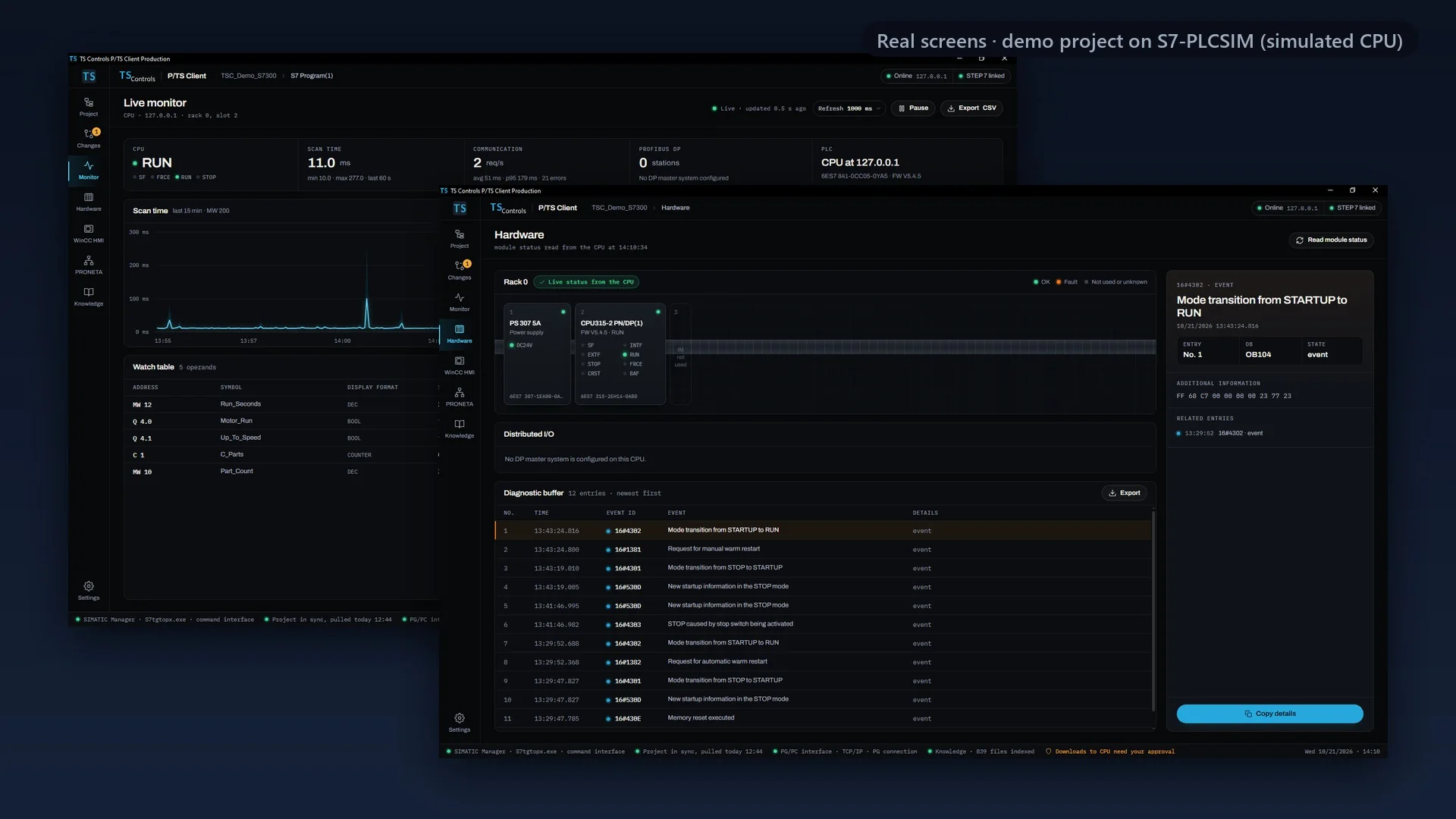
- A working prototype. Real screens from P/TS Client 1.2.0 Production (pre-release) on our engineering workstation, using a demo project on S7-PLCSIM, Siemens’ PLC simulator.
- Each screen is captioned: P/TS Client 1.2.0 Production (pre-release), real screen, demo project on S7-PLCSIM (simulated CPU).
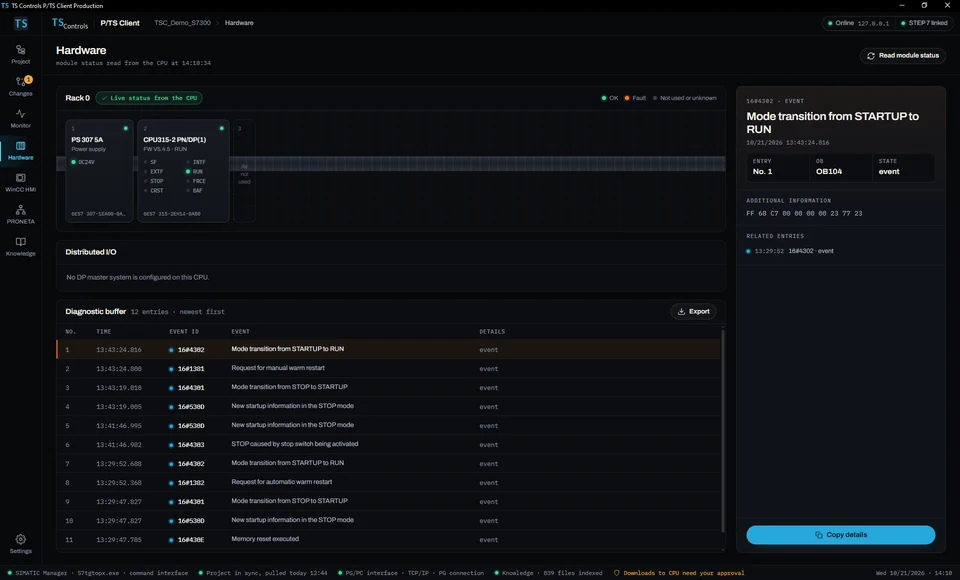
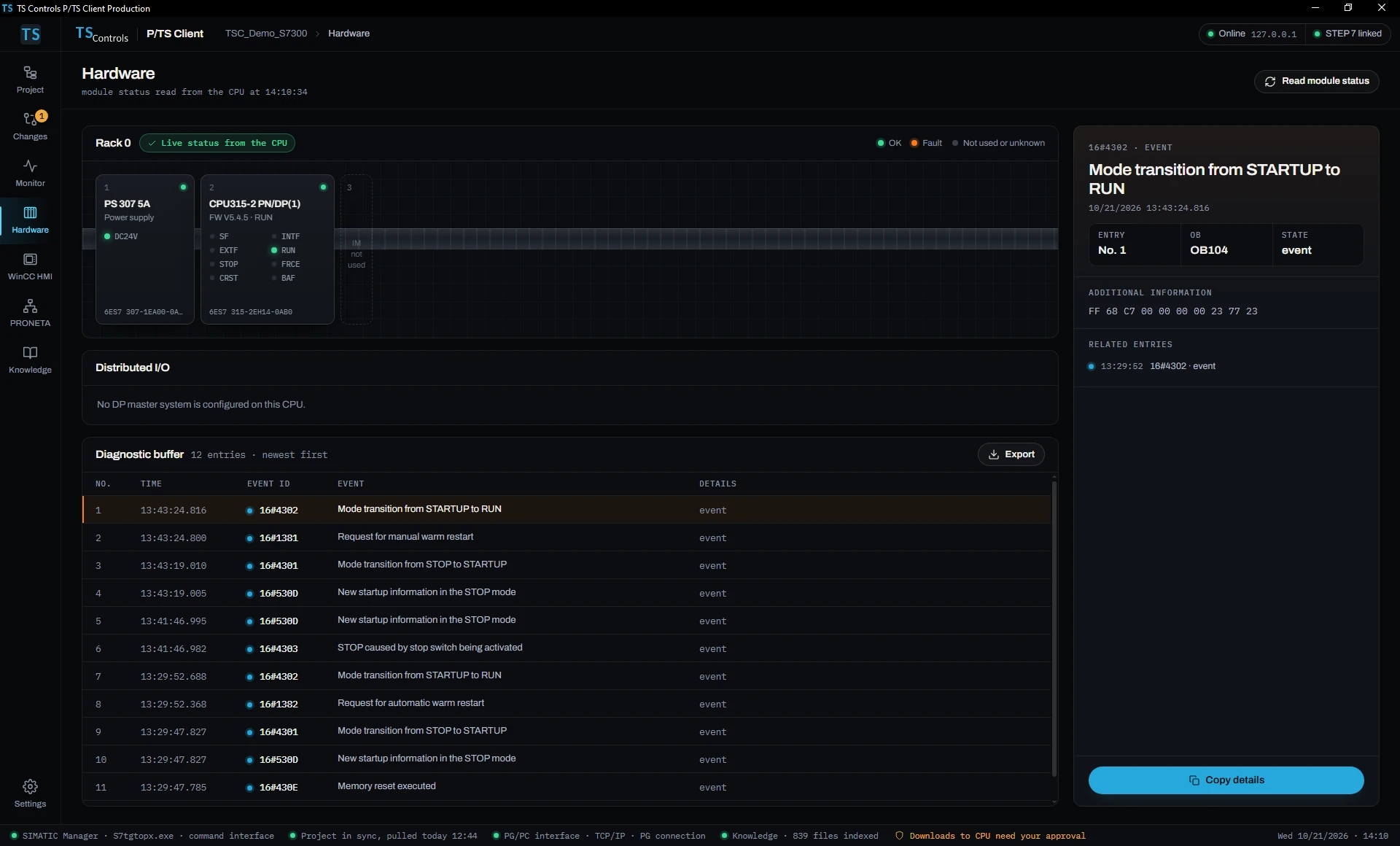
- Hardware: the station and the CPU’s diagnostic buffer.
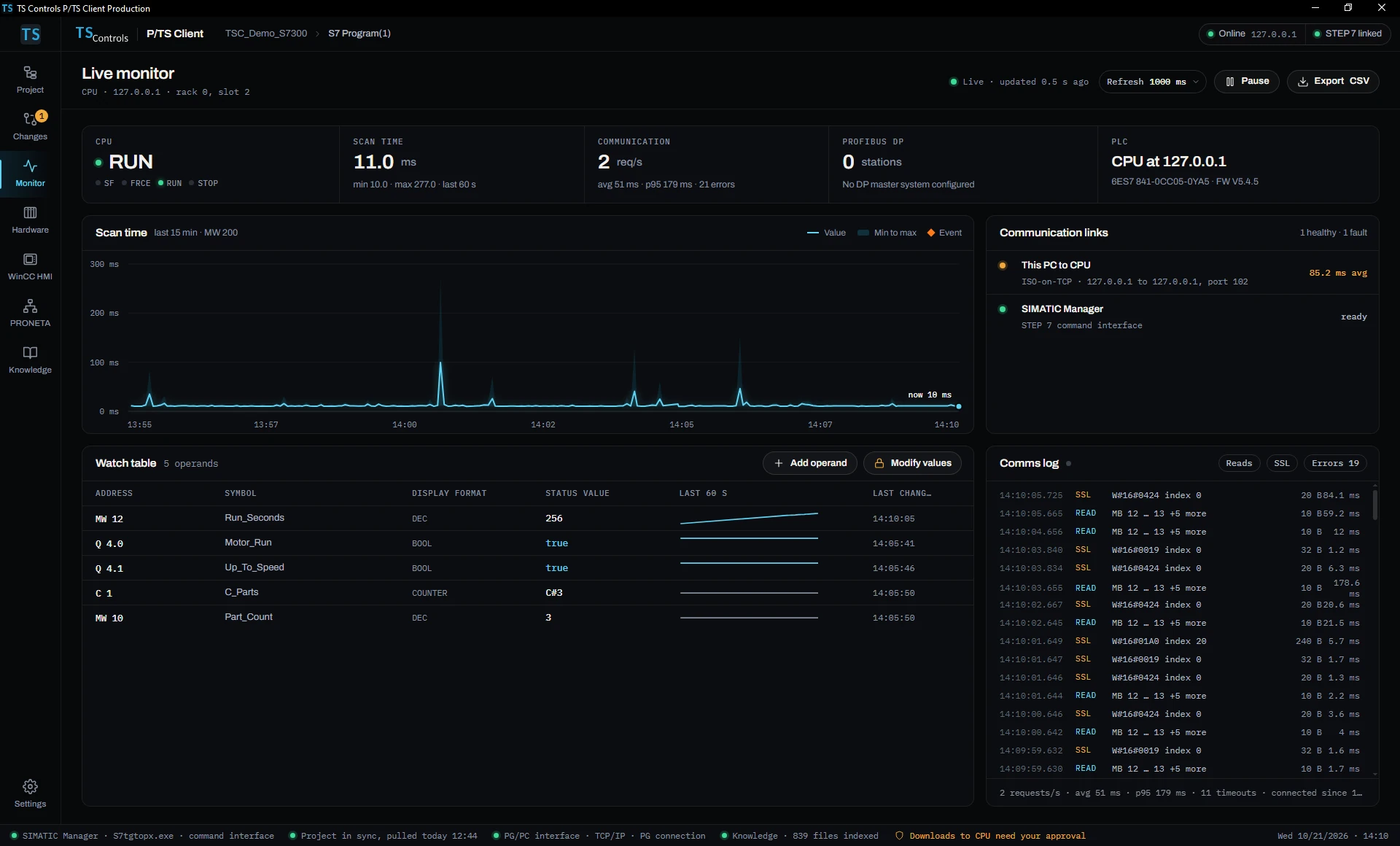
- Live values in a watch table.
- Programming: a block open with a staged edit.
- Changes: a hand-made edit waiting for approval. (“Hand-made” means the edit was typed into the editor, not generated by P/TS Client; in this demo, our AI assistant typed it.)
- What your pledge finishes: WinCC HMI checks, PRONETA PROFINET import and a signed installer.
- Human in command: nothing reaches the CPU without your approval.
- Back the build. ts-controls.com. Integrity first. Then the work.
Music: “Inspired” Kevin MacLeod (incompetech.com), licensed under Creative Commons: By Attribution 4.0, edited excerpt. Sound effects: Kenney (kenney.nl), CC0.
Four jobs, one app.
Troubleshooting works in the pre-release build today. Programming partly works. WinCC HMI checks and PRONETA import don’t work yet: the campaign funds finishing them.
Works today
Troubleshooting
Works in the pre-release build. Goes online to the CPU over Ethernet (ISO-on-TCP), reads the module status and the diagnostic buffer with Siemens’ standard text for each event, and watches the values you pick, with a communication log and a scan-time chart. The chart reads a memory word that your OB1 copies the scan time into.
Partly works
Programming
Opens a SIMATIC Manager project by its .s7p path and pulls in its blocks and symbols. Your STL edit is held as a pending change, with your reason, side by side with the current block. Approve, compile, back up and download are built but not tested yet.
In development
WinCC HMI checks
Will cross-check HMI tags and alarms against the PLC program’s symbols and addresses, so the operator side matches the logic. Not working yet.
In development
PRONETA import
Will import a PROFINET scan from Siemens PRONETA and check device names, IP addresses and topology against your hardware configuration. Not working yet. PRONETA covers PROFINET only.
It also has a Knowledge view: an offline keyword search of the Siemens manuals and FAQs you already keep on your PC. It’s plain local search, not AI, and it doesn’t include any Siemens documents.
What it looks like today.
Real screens of P/TS Client 1.2.0 Production (pre-release), with nothing inside them changed. They show our demo project, TSC_Demo_S7300, running on S7-PLCSIM (simulated CPU), not a customer’s machine.
 (opens the full-size screen)
Hardware. Module status and the diagnostic buffer, read from the CPU, with Siemens’ standard text for each event. 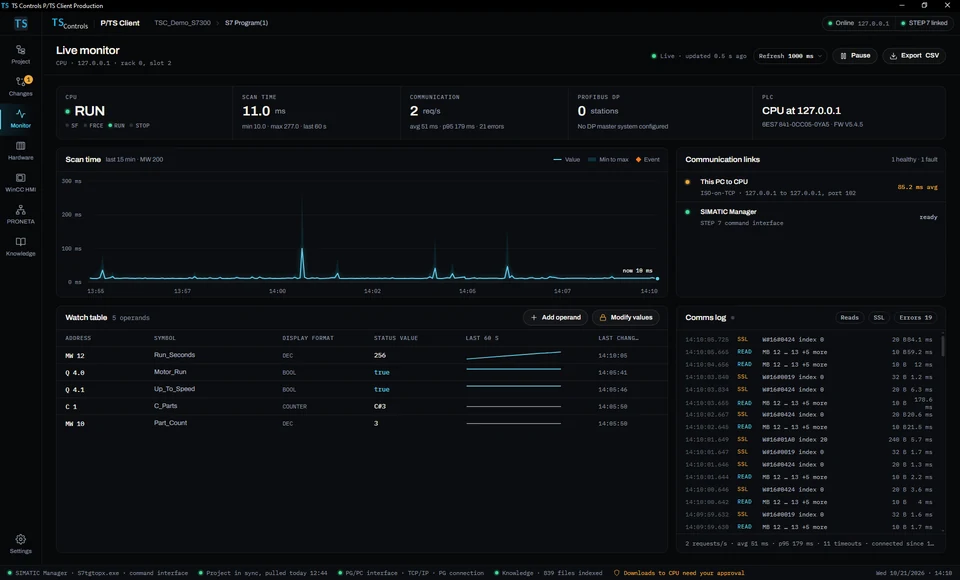 (opens the full-size screen)
Live monitor. Live values in a watch table, with a communication log and a scan-time chart. 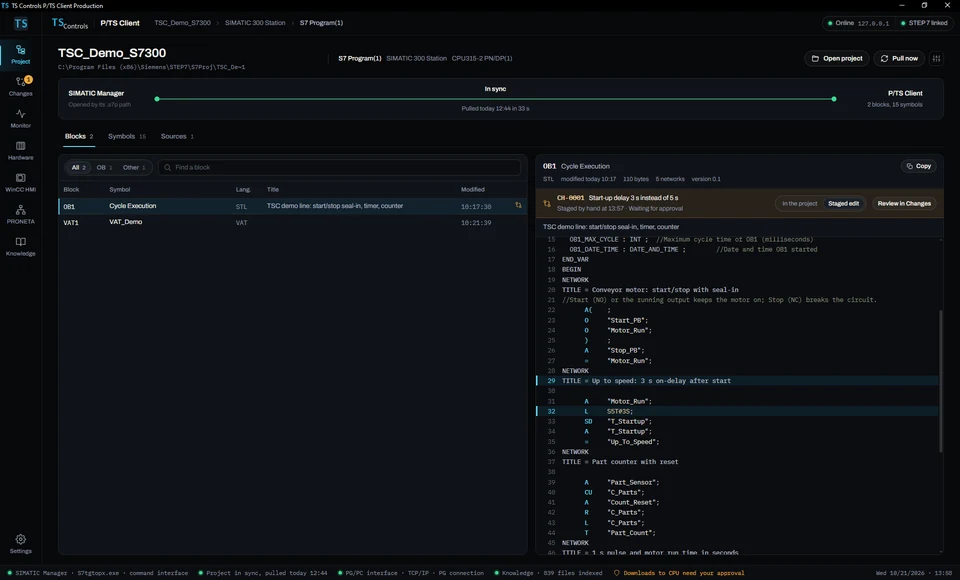 (opens the full-size screen)
Project. A SIMATIC Manager project pulled in by its .s7p path, with a staged STL edit held for review. 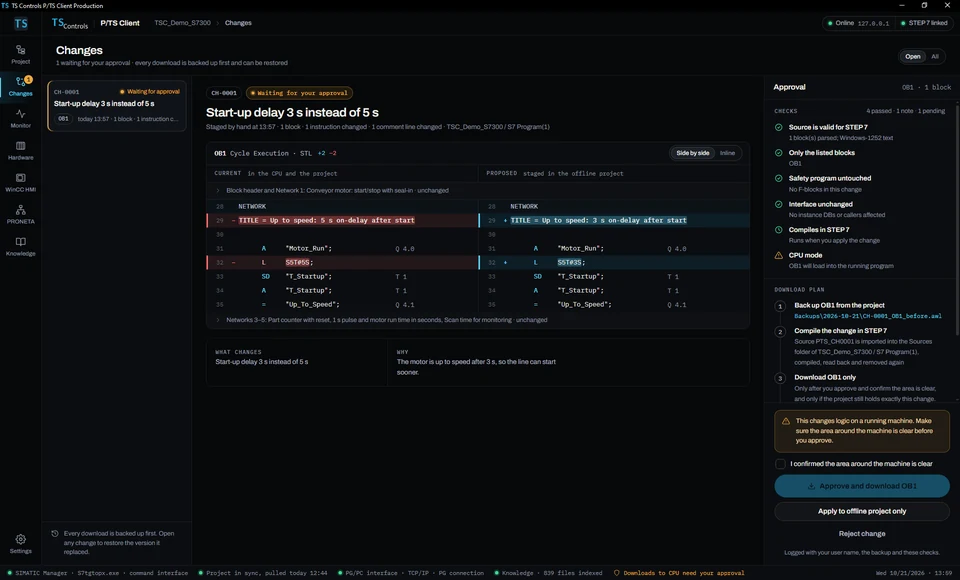 (opens the full-size screen)
Changes. The pending edit side by side with the current block, waiting for an engineer’s approval. Approve-and-download is built but not tested yet.
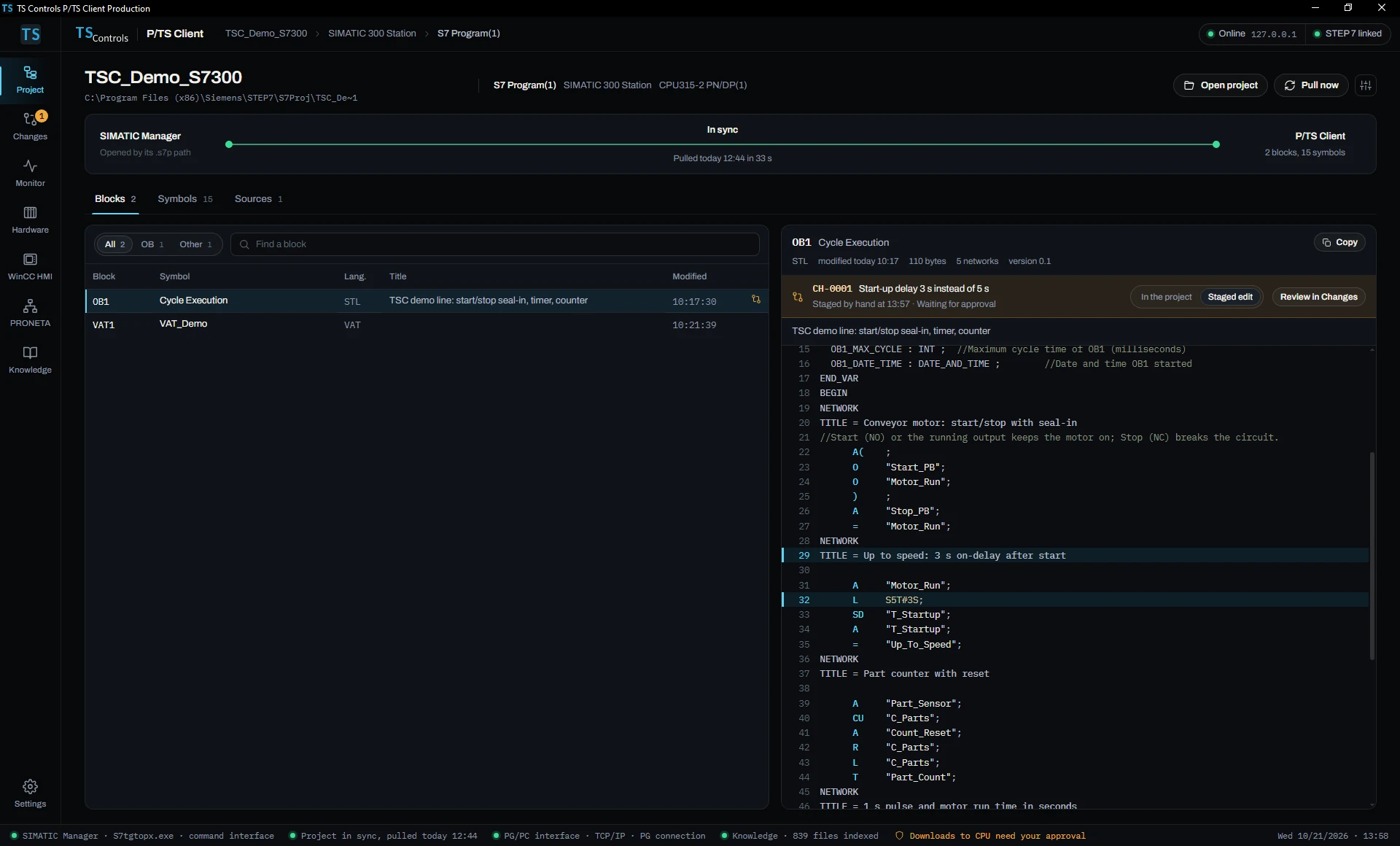
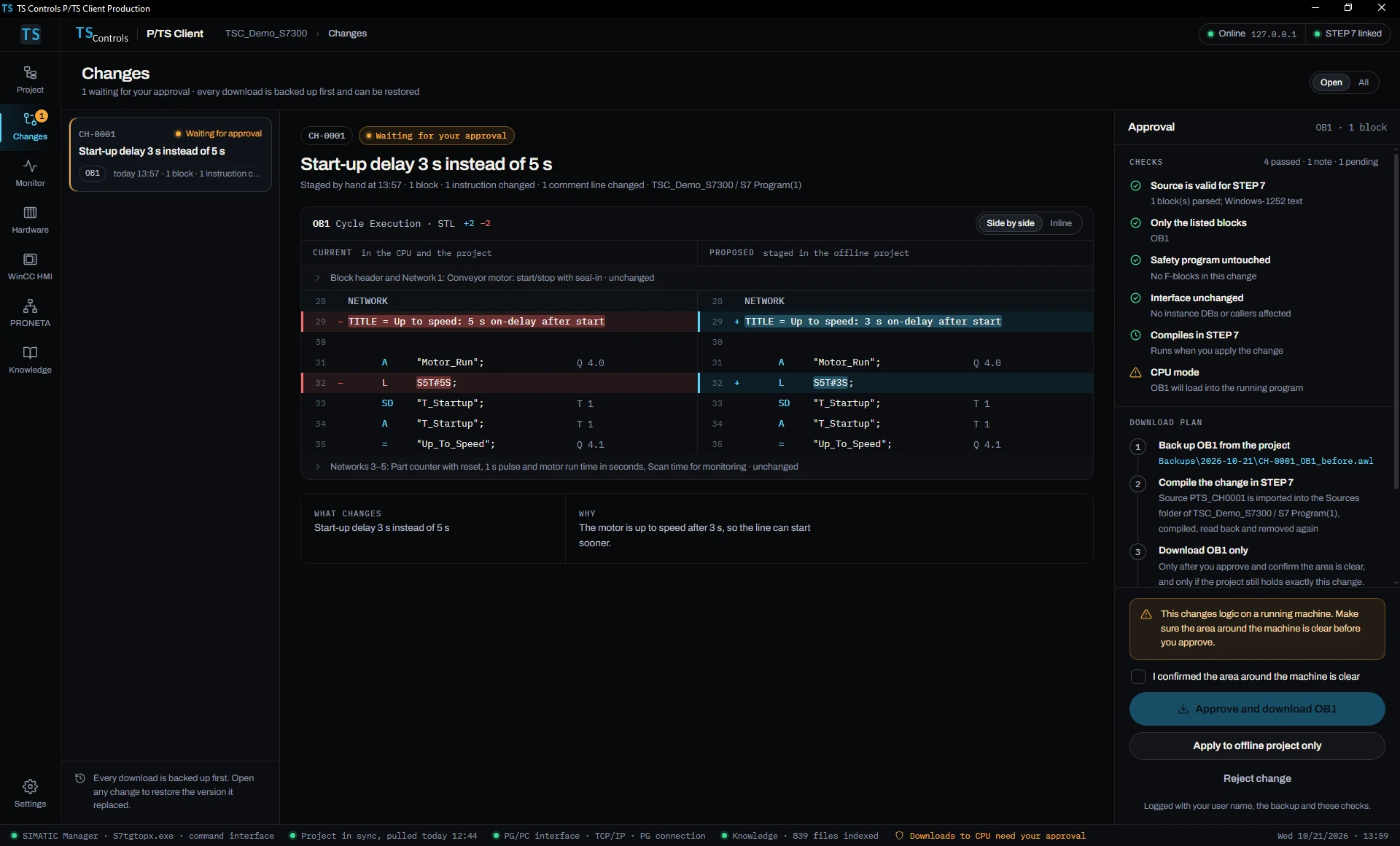
In the Project and Changes screens, “Staged by hand” means the edit CH-0001 was typed into the editor, not generated by P/TS Client. For this demo, our AI assistant typed it.
No AI. The engineer in command.
No AI in the backer edition
The P/TS Client backers receive has no AI features, assistant or model, and we won’t add any in later updates. It has no connection to an AI model and no place to store an API key. Every check it runs is a fixed rule in its program code. We tried an AI assistant during development; it remains only in our internal development build, which backers never receive.
Nothing reaches the CPU without your approval
On its own, P/TS Client only reads values and holds edits for review. It is designed to ask an engineer before it downloads to a CPU, modifies or forces a value, or changes a device name or IP address, and every download plan starts by saving a copy of the block.
P/TS Client is a tool for qualified controls engineers. It does not replace your plant’s safety systems, interlocks, lockout/tagout or change procedures, and the engineer who approves a change is responsible for it, under the plant’s own safety and change procedures. Try each beta build on a test bench or an offline project before you use it on a running line. It works with your own licensed Siemens software.
What works, and what your pledge pays for.
The 1.2.0 Production build has so far run only on S7-PLCSIM, Siemens’ PLC simulator. Another build of P/TS Client has been online to a real S7-300 CPU.
Works today
- Goes online to an S7-300 CPU over Ethernet (ISO-on-TCP)
- Reads module status and the diagnostic buffer
- Watches live values
- Opens a SIMATIC Manager project by its .s7p path and pulls in its blocks and symbols
- Holds your STL edits for review, side by side with the current block
- Searches your manuals offline
Built, not tested yet
- Approving and downloading a change
- Compiling it in STEP 7
- The automatic backup before each download, and restoring it
- Writing an approved change into your offline project
- Modifying values from the Monitor screen
In development
- WinCC HMI checks
- PRONETA import
- Cause-and-remedy notes for diagnostic events
- Comparing your blocks with your last project archive
- An installer signed with a public code-signing certificate
Known issues: the installer is signed only with our development certificate, so Windows SmartScreen shows a warning; the link to the simulator was unreliable in our tests; and the event detail panel can show a wrong OB number. Your pledge pays for finishing the app, a test bench with real S7-300, HMI and PROFINET hardware, development licenses, a code-signing certificate, and Kickstarter’s fees.
From beta to licenses.
After the campaign
A backer survey, then beta access for every backer with a P/TS Client seat. Try each beta build on a test bench or an offline project first.
April 2027
Licenses for Founding Seat backers: troubleshooting, block edits with approve-and-download tested on real hardware, and a signed installer.
June 2027
Controls Team and Integrator Pack rewards: P/TS Client licenses, plus remote onboarding for Integrator Pack.
July 2027
Plant Partner rewards: P/TS Client licenses and onboarding, with an on-site S7-300 health check booked with your plant.
As each passes bench testing
WinCC HMI checks, PRONETA import, cause-and-remedy notes and archive comparison come to the same license as free updates.
If a date changes, we’ll post a backer update with the reason and the new date.
Questions
Straight answers.
Can I buy P/TS Client today?
Not yet. It is in development, and the Kickstarter campaign funds finishing it. Backers with a P/TS Client seat get beta access after the campaign, and licenses from April 2027. Rewards and pledge levels are on the Kickstarter page.
Does P/TS Client use AI?
No. The P/TS Client backers receive has no AI features, assistant or model, and later updates won’t add any. We tried an AI assistant during development; it remains only in our internal development build, which backers never receive. Every check P/TS Client runs is a fixed rule in its program code, not an AI model. We do use an AI assistant to help write its code and the campaign text, and it operated the app for the screenshots, including typing the demo edit CH-0001: “Staged by hand” and “a hand-made edit” mean the edit was typed into the editor, not generated by P/TS Client. The campaign’s Use of AI section explains how.
Which PLCs and connections does it work with?
S7-300 CPUs over Ethernet (ISO-on-TCP), with projects from SIMATIC Manager (STEP 7 V5.x). MPI and PROFIBUS connections aren’t supported. PRONETA covers PROFINET networks only.
Do I need Siemens software?
Yes. P/TS Client depends on your own licensed STEP 7 V5.x today, and its WinCC and PRONETA features will depend on those programs (PRONETA Basic is a free Siemens download). It works alongside them and doesn’t replace them, and it doesn’t include any Siemens software or documents. TS Controls is an independent integrator, not affiliated with Siemens.
What if the campaign doesn’t reach its goal?
Kickstarter is all or nothing: backers are charged only if the project reaches its goal by Sun, Dec 20, 2026, 5:34 PM ET.
Live on Kickstarter until Dec 20, 2026
Help us finish P/TS Client.
S7-300 troubleshooting and block editing for SIMATIC Manager. Help us finish its WinCC HMI and PRONETA PROFINET tools.
Siemens, SIMATIC, STEP 7, S7-300, S7-PLCSIM, WinCC and PRONETA are trademarks of Siemens AG. PROFINET and PROFIBUS are trademarks of PROFIBUS Nutzerorganisation e.V. Kickstarter is a trademark of Kickstarter, PBC. TS Controls is an independent integrator, not affiliated with, sponsored by or endorsed by Siemens or Kickstarter.